Most of us have become familiar with asking AI a question. We open a conversation, explain what we need and read the response.
But much of our working life happens between those conversations. A customer replies. A deadline moves. A document changes. Something that looked straightforward yesterday suddenly needs a decision today.
Keeping track of all this takes attention, even when the individual tasks are small.
OpenAI’s dots bring an interesting idea into that space: an AI agent that keeps working between conversations and returns when there is a result or a decision that needs you. OpenAI describes dots as always-on agents, powered by GPT-6 Astra, with their own cloud computer and browser.
The opportunity is easy to understand. You give the assistant a responsibility, then continue with your day.
What exactly is a dot?
Think of a dot as a digital assistant with an ongoing brief.
An AI agent is software that can use tools to take steps towards a goal. A dot combines that ability with continuity: it can keep track of assigned work, use relevant context and pick it up again as circumstances change.
Imagine asking an assistant to help organise a workshop. You would explain the date, budget, people involved and decisions you want to approve. You would expect useful updates as replies arrive.
That is a helpful way to think about the experience. The quality of the brief matters as much as the ambition of the request.
How does it work?
There are several parts worth understanding.
Its cloud computer provides somewhere to work. Your dot can use its own browser, files and software. Cloud work can continue while your devices are switched off. Its browser sessions are separate from yours, so being signed in on your laptop does not automatically sign your dot in.
Connected apps provide access to information and tools. Supported plugins can connect services such as Gmail, Google Drive or GitHub, within the permissions you have granted. Connecting a place to message your dot does not automatically connect your inbox or other accounts.
Memory provides continuity. Your dot uses relevant ChatGPT memory and its own notes about preferences, decisions and ongoing responsibilities. Those notes are not a complete record of everything you have ever said. It can also divide work among background agents.
Instructions define the job. You explain the desired result, the sources it should use and when it should involve you. For recurring work, specify the schedule, time zone and destination, then ask it to confirm what it saved. Event monitoring depends on what the connected service supports. Simply connecting a service does not start monitoring it.
“Always on” therefore means it can continue work between conversations. It can pause and resume; it does not mean every task runs continuously or that it watches every account automatically.
A useful first job: the morning briefing
Here is a practical example I would suggest starting with.
You want to begin the day knowing what needs a decision. Rather than asking for a summary of everything, give your dot a clear definition of importance.
An illustrative brief might be:
For the next seven days, prepare a briefing at 7 am Europe/London using my connected email and calendar. Highlight messages requiring a response today, changes to today’s meetings and deadlines within 48 hours. Include links to the original items. Draft suggested replies for my review. Ask for my approval before sending messages or changing appointments. If something is unclear, flag it rather than guessing. Confirm the schedule and tell me which sources you can access.
The difference is in the detail. “Important” could mean a customer complaint, a payment deadline or a meeting that starts in an hour. Your dot needs to understand what matters to you.
After a few briefings, review the misses. Was an ordinary newsletter treated as urgent? Was an important customer reply overlooked? Correct the criteria before expanding the responsibility.
Who could find it useful?
You do not need to be a programmer to describe a useful job. These are possible starting points, subject to access and supported tools:
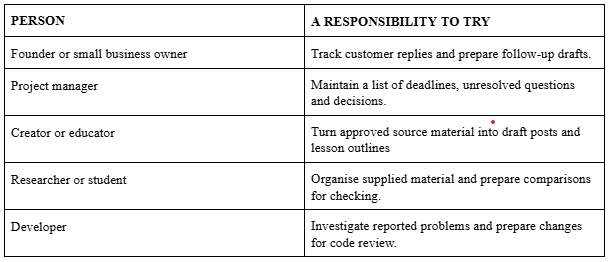
For a Learn with Tochii workshop, for instance, a useful brief could cover venue replies, sponsor questions and outstanding preparation. I would want the assistant to bring me decisions about cost or commitments, with the relevant evidence attached.
That is a proposed workflow, rather than a claim that I have already run it with dots.
Who can actually access dots?
As of 3 October 2026, OpenAI’s documentation lists a gradual rollout:
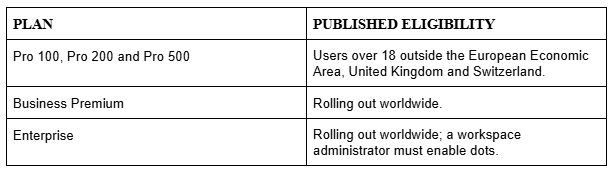
For UK readers, the regional restriction on Pro is particularly relevant. An eligible plan also does not guarantee immediate access during the rollout.
Setup begins in the desktop app or a desktop browser. Mobile app use follows setup when the supporting update is available; mobile web is unsupported. OpenAI also distinguishes dot conversations from delegated Work or Codex tasks, which retain those products’ usage limits.
How to get started
If dots is available to your account, open it in ChatGPT and follow the introduction. Connect the apps needed for your first responsibility. You can add more later.
Then choose one task with a result you can inspect. Explain what it should produce, where the information lives and which decisions belong with you. Review the first result and correct missing details. You can keep steering the work in the same conversation.
Connecting your own computer is optional. If you want the dot to use that computer’s local files or apps, the computer must be online with the ChatGPT app open. Cloud work has different requirements and can continue without your device.
My suggestion is to begin with preparation: briefings, comparisons and drafts. That gives you something concrete to judge.
How much authority should you give it?
Reading a message, drafting a reply and sending it are three different responsibilities.
OpenAI applies existing app permissions, built-in safeguards and automatic action review. Optional custom rules let you specify actions that can proceed, require approval or need handing back to you. Asking for a draft does not authorise sending it. Rules can also be misunderstood, so review important results.
One sensible boundary for an early trial is to allow reading and drafting while requiring approval for customer messages, purchases and calendar changes.
You can inspect delegated work in Activity and recurring tasks in Scheduled. Pausing the dot’s main task does not stop every delegated task or cancel its schedules. Stopping work also does not undo completed actions.
The practical lesson is to make both the responsibility and the stopping point clear.
Reflection for the week
What interests me most is the movement towards delegating ongoing responsibility.
That places greater weight on the ideas we have explored in this series: context, memory, evaluations and AI harnesses. An assistant needs the right information, a way to carry decisions forward, a means of checking results and controls around its actions.
At Amakora, our direction with BuildAI centres on governed, measurable execution. Dots makes the underlying question tangible: how do we allow AI to carry useful work forward while keeping authority and accountability clear?
I would judge a dot by the decisions it helps me make, the follow-ups it catches and the corrections its work requires.
Saving ten minutes is useful. Repeatedly catching something that would otherwise have been missed may be more valuable.
Questions to sit with
What responsibility do you repeatedly check because nobody else is keeping track of it?
What would a useful result look like, and how would you check it?
Which actions would you allow, and which would require your approval?
Keep learning with me
Subscribe to Learn with Tochii for clear explanations that help you understand AI and make practical decisions about it.
If you know someone exploring always-on agents or setting up their first dot, share this article with them.
Until next week,
Tochii
Founder, Learn with Tochii
Inspire · Educate · Empower
Sources
Product details and availability checked on 3 October 2026. The examples and recommendations above are illustrative.