
There is a familiar kind of work that rarely appears in a job description: keeping track of everything.
You remember the message that needs a reply, the document you promised to review and the booking you have yet to make. None of these is necessarily difficult. Together, they occupy a considerable amount of attention.
Meta’s Muse is designed to help with that ongoing work. Introduced on 8 September 2026, it is a personal AI agent powered by Muse Spark, with a dedicated cloud computer and browser. Meta describes it as an assistant that can advance tasks after you close the app and return when it needs your approval.
The question I find interesting is how we give such an assistant a useful job and judge whether it is doing that job well.
What exactly is Muse?
A personal AI agent is software that can use tools to pursue a goal on your behalf. Instead of only producing an answer, it may take a sequence of steps towards a result.
Muse is the product you interact with. Muse Spark is the model family providing its underlying intelligence. Meta’s Spark 1.3 announcement describes improvements in longer tasks, handling multiple workflows and asking for help when needed. Those are reported capabilities, rather than a guarantee about every result.
Imagine asking a capable assistant to help plan an event. You would explain the date, budget and people involved. You would expect research and preparation, then an opportunity to approve commitments.
That is a useful starting point for understanding Muse. Delegation requires a brief.
How does it work?
Muse brings together several components.
A place to execute work. Its cloud computer gives it a browser, files and tools. Meta’s design account says it can create documents, PDFs, web pages and other outputs, and write code for tasks that need it.
Connections to your services. These provide the information and actions needed for a task. The value depends on the accounts you connect and the access you allow.
Continuity. Muse can manage background work, use memory across conversations and surface useful changes. Its interface includes an activity log, memory files and a Goals view for tracking ongoing work. You can also adjust how proactive it is.
Controls around actions. Meta describes a separate Sentinel agent that reviews outbound activity. Sensitive steps, such as sending an email or buying something, require approval.
The combination is what makes an agent useful. Reasoning helps it choose a next step; tools make that step possible; controls determine whether it is allowed.
A simple example
Suppose you are preparing a small workshop. You need a venue shortlist, a budget and draft messages to potential guests.
A useful initial request might be:
Help me prepare a workshop for 20 people. Use the brief I provide to compare suitable venues, build a budget and draft invitation messages. Include links to your sources and flag missing information. Ask for my approval before contacting anyone, making a booking or spending money. Tell me which connected services you can use.
This is an illustrative brief. It does not imply that every venue, booking service or account supports the same actions.
The request is useful because you can inspect the result. Is the venue actually suitable? Does the budget include the relevant costs? Does the invitation accurately explain the event?
Once those outputs are dependable, you can decide whether to extend the responsibility.
Who could use Muse?
The experience is intended for people who can describe a goal in ordinary language. Different users might begin with different jobs:
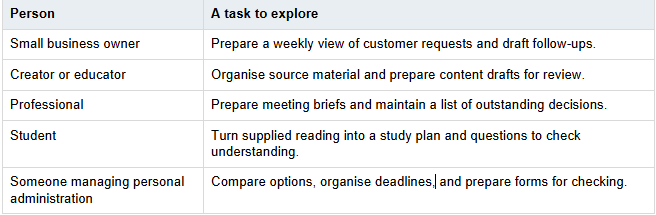
These are possible applications. A useful trial starts with the information and tools actually available to your account.
What changed for small businesses?
On 29 September, Meta expanded Muse with business skills and connectors. Its announcement names tools including Canva, Shopify, QuickBooks, Stripe, Notion, Slack and Zoom, alongside Facebook and Instagram business accounts.
Meta presents uses such as preparing growth plans, reviewing campaigns, drafting content and examining business performance. It says publishing, sending and spending require approval.
For a small business, the practical opportunity is bringing information together. An owner might ask for a campaign proposal informed by sales and social performance, then inspect the reasoning before publishing anything.
For Learn with Tochii, I would consider a workflow that compares educational content performance and prepares a draft plan for the next week. I would want it to explain the evidence behind each suggestion.
The same discipline applies to financial material: check the underlying records and calculations before relying on a conclusion. A connected accounting service does not make every interpretation correct.
Where is Muse available and what does it cost?
Meta’s original launch described a US rollout across iOS, Android and the web. Its newer small-business announcement describes Muse as available in the US and Canada. For UK readers, these sources do not establish a general UK rollout.
Meta says Muse is free for most needs, with subscription options for people who want more. Check the offer presented to your account for current capacity, pricing and features.
Do not confuse Muse access with Meta One. Meta One is a broader subscription programme spanning Meta apps, with features and availability that vary by account and region. Global availability of those subscriptions does not, by itself, establish global availability of Muse.
If Muse is available to you, start through its official app or muse.ai, review the permissions requested and connect only the services needed for your first task.
What should you understand about privacy?
This is where precise language matters.
Meta says Muse’s VM data and conversations are not shared with its advertising systems. Its technical account also explains that browsing or transactions can indirectly influence advertising through the external services involved. Model-training use has an opt-out setting.
The current Secure VM and the planned Confidential VM are different. Meta’s safety account says the existing architecture restricts personnel access through policies but does not prevent Meta accessing data when needed to operate, support or secure the service. Confidential VM is intended to add verifiable protection against provider access and was described as coming later in the year.
That distinction is more useful than a blanket claim that nobody can ever see your data.
Meta also acknowledges that Muse can make mistakes and remains vulnerable to attacks such as prompt injection.
Prompt injection is when material an agent reads attempts to redirect it. Imagine a document that tells an assistant to ignore your instructions and disclose a private file. The document should be treated as information to assess, rather than authority to obey.
What is coming beyond the app?
At Connect, Meta announced plans to bring Muse to AI glasses in the coming months. It also described voice interaction, more connectors, an agent email address and Muse Charm, a pocket device with more details promised later in the year.
The idea is that an agent could help in the setting where a need arises. Looking at a flyer might become the beginning of planning, rather than something you must remember to research later.
These announcements are worth following, but timing and availability matter. A demonstration of a future experience is not evidence that it is available to your account today.
How I would judge it
I would run a small trial with a clear definition of success.
Choose a recurring job, provide the relevant sources and keep consequential actions subject to approval. Then ask:
Did it use the right information?
Was the result accurate and complete enough to use?
Did it flag uncertainty and ask for decisions at useful moments?
Did reviewing and correcting the work take less effort than doing it myself?
The last question matters. A beautifully presented draft can still create work if its details are unreliable.
Reflection for the week
Muse gives everyday users a tangible way to encounter ideas we have explored throughout this series: memory, context, AI harnesses and evaluations.
My interpretation is that a personal agent’s value will depend increasingly on its judgement about when to act, when to interrupt and when to ask.
At Amakora, our direction with BuildAI centres on governed, measurable execution. Muse makes that discussion accessible: a person wants an assistant to help, while retaining authority over commitments made in their name.
For me, trust would grow through a pattern of useful, inspectable work. The assistant catches something relevant, explains its evidence and leaves me with a clearer decision.
That is a practical standard against which to judge the promise.
Questions to sit with
What ongoing responsibility would you give a personal agent first?
Which information would it need, and what access would you be comfortable granting?
What would make you trust it with a larger responsibility?
What would you ask Muse to help with? Share your first task in the comments.
Help shape future articles
I’m putting together future guides on practical ways professionals can use AI at work, in school, and in everyday life.
What’s one AI question you’ve always wanted answered?
Your responses will help decide what I write about next.
Take the 2-minute survey: https://bit.ly/LWTsurvey
Explore our courses: amakoragroup.com/training
Apply for our fellowship: amakoragroup.com/contact
Tochii Achebe, founder of Amakora. Questions or training for your team: contact@amakoragroup.com
Sources
Checked on 3 October 2026. Product claims are attributed to Meta; suggested workflows and reflections are the author’s.