We all know the standard ChatGPT routine: you open a conversation, ask for a quick email draft or document summary, copy the output, make your edits, and move on. While that quick-hit utility is here to stay, it is no longer the full picture.
With the launch of GPT-5.6 and ChatGPT Work, OpenAI is transforming ChatGPT from a reactive tool into a proactive system. It can now gather context, plan an approach, and work seamlessly across connected apps to produce finished documents, presentations, spreadsheets, websites, and complex analyses.
The most significant shift isn’t just a smarter AI, it’s a spectrum of intelligence tailored to your workload. Powered by the new GPT-5.6 family of three models: Sol, Terra, and Luna, you can now choose the perfect balance of capability, speed, and cost. Housed within ChatGPT Work, these models finally have an environment where they can orchestrate files and tools to complete massive projects from start to finish.
The question is no longer only:
What should I ask ChatGPT?
It is also:
Which model should do this work, how much reasoning does it need and what context should I give it?
This guide will help you answer those questions.
First, understand what has changed
Most people still think about AI as a chat interface.
You enter a request. It returns an answer.
ChatGPT Work introduces a broader way of working. Instead of only answering questions, it can help move work from scattered information to a finished output.
You can give it meeting notes, spreadsheets, messages, documents, email context and an existing presentation template. It can gather what matters, plan the work and turn the material into something you can review and share.
For example, a marketing manager could ask ChatGPT Work to:
Review a campaign brief.
Gather performance data from a spreadsheet.
Identify patterns in customer feedback.
Compare the results with the original campaign objectives.
Create an executive-ready performance presentation.
Recommend what should change in the next campaign.
Previously, this might have required moving manually between several tools and completing each stage separately.
ChatGPT Work is designed to connect those stages.
The shift is from asking AI to help with one task to giving AI responsibility for an outcome.
You are still responsible for the final decision. ChatGPT gathers, analyses, drafts and refines. You review the approach, correct its assumptions and approve the finished work.
That distinction matters.
Automation without judgement creates faster mistakes. The goal is not to remove the professional from the process. It is to reduce the amount of mechanical work between the professional and the decision that needs to be made.
Why are there three GPT-5.6 models?
OpenAI’s earlier model names were not always easy to interpret. Names such as GPT-4o, GPT-4o mini and GPT-4 Turbo described different products, but they did not give the average user an obvious decision system.
GPT-5.6 introduces a clearer structure.
The number identifies the generation. The name identifies the capability tier. OpenAI describes Sol, Terra and Luna as durable tiers that can advance independently as the underlying technology improves.
The three tiers are:
Sol: The flagship model, designed for the most demanding work.
Terra: The balanced model for everyday professional work.
Luna: The fastest and most affordable model, designed for efficient and high-volume work.
Think of it this way:
Sol is the specialist you call when the problem is genuinely hard. Terra is the capable colleague who handles most of your work well. Luna is the efficient assistant you use when you need something done quickly and consistently.
The models are not simply good, better and best. They are designed for different kinds of work.
GPT-5.6 Sol: when depth and judgement matter
Sol is the flagship model in the GPT-5.6 family.
It is designed for complex work where quality, depth and judgement matter more than receiving an immediate answer. OpenAI positions it for demanding tasks across coding, research, knowledge work, science, cybersecurity and design.
Use Sol when the task involves:
Several sources of information.
Ambiguous or incomplete instructions.
Important trade-offs.
Detailed analysis.
Multiple connected stages.
Specialist or technical reasoning.
A polished output that will be shared with decision-makers.
Consequences that would make a weak answer expensive.
Imagine that you need to prepare a quarterly business review for senior leadership.
You have sales data in Excel, customer feedback in a document, project updates in team messages and last quarter’s presentation as a reference.
This is a Sol task.
The difficulty is not simply creating slides. The model must determine what changed, identify the most important drivers, recognise risks, decide what deserves leadership attention and present the information in the organisation’s existing format.
A useful instruction might be:
Review the attached sales data, customer feedback and project updates. Compare current performance with the targets in last quarter’s business review. Identify the three most important business drivers, any risks that leadership needs to address, and the decisions required this quarter.
Use the attached presentation as the design and structural reference. Create an executive-ready presentation with no more than 12 slides. Show me your proposed storyline before building the final deck. Do not invent missing figures. Flag any information that needs verification.
Notice that this brief does not tell the model how to complete every individual step.
It defines the outcome, context, constraints, review point and expected standard.
That is where Sol is most useful.
GPT-5.6 Terra: the balanced choice for everyday work
Terra is designed to provide a strong balance of capability, speed and efficiency.
It is the model to use when the work requires thought and structure but does not need the deepest level of analysis available.
Use Terra for:
Drafting routine documents.
Turning meeting notes into action plans.
Creating first drafts of reports.
Organising research.
Comparing a manageable number of options.
Preparing content plans.
Reviewing and interpreting a small dataset.
Updating an existing document using clear instructions.
Writing stakeholder communications and project briefs.
Completing standard, well-scoped coding tasks.
Suppose you have notes from a weekly project meeting and need to turn them into a useful update for your team.
That is a Terra task.
You could write:
Turn these meeting notes into a weekly project update for the delivery team. Organise the update under progress this week, decisions made, current blockers, action items, owners and deadlines.
Keep it under 500 words. Use direct language. Do not repeat discussions that did not lead to a decision or action. Flag any action item that does not have a clear owner or deadline.
The task requires judgement, but the scope is clear. The model does not need to conduct extensive research, resolve a difficult strategy question or coordinate several complex workstreams.
Terra is likely to be enough.
If you are unsure which model to use, Terra is a sensible place to start. Move to Sol when the work requires deeper judgement, a longer chain of reasoning or greater reliability across a complex workflow.
GPT-5.6 Luna: speed, consistency and volume
Luna is the fastest and most affordable model in the GPT-5.6 family.
It is designed for high-volume or straightforward work where speed matters and the reasoning burden is relatively low.
Use Luna for:
Reformatting text.
Extracting information from consistent documents.
Generating variations of approved copy.
Categorising feedback.
Renaming or organising files.
Applying a known template repeatedly.
Making simple changes to existing material.
Supporting customer-facing applications where quick responses matter.
Processing large volumes of similar requests.
Imagine that your team has collected 300 customer survey responses. You already know the categories you want to use: pricing, onboarding, product usability, customer support and feature requests.
You do not need the model to develop a new customer-experience strategy. You need it to classify the responses consistently and highlight recurring phrases.
That is a Luna task.
Your instruction could be:
Categorise each survey response into one primary category: pricing, onboarding, product usability, customer support or feature request.
Add a sentiment label of positive, neutral or negative. Preserve the original response in the first column. If a response does not fit any category, label it “Other” rather than guessing. Return the result as a spreadsheet-ready table.
Luna is not an unserious model. It is a model optimised for a different kind of work.
Using Sol for every small task is like asking your most senior strategist to spend the day renaming folders. The work may be completed well, but you are using more capability than the task requires.
The pricing, because it matters
Model selection is also a cost decision, particularly for organisations and developers using the API at scale.
At the time of writing, OpenAI prices the models per one million tokens as follows:
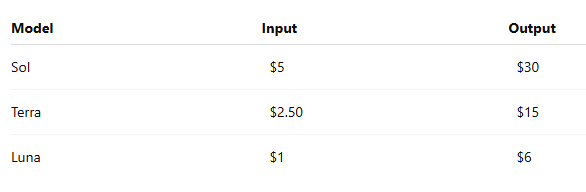
This means Sol costs five times as much as Luna per input or output token.
That difference may be unimportant for one short request. It becomes significant when a product or workflow processes thousands of requests.
The objective is not to choose the cheapest model. It is to avoid paying for capability that the task does not require.
Sol earns its place when the work is genuinely difficult. Terra offers a practical balance for most professional tasks. Luna makes speed and scale more affordable.
The simplest way to choose
Before selecting a model, ask three questions.
1. How difficult is the judgement?
If the task requires strategy, careful reasoning or choosing between competing priorities, use Sol.
If the judgement is moderate and the desired output is clear, use Terra.
If the task mainly involves following an established rule or format, use Luna.
2. How costly would a weak answer be?
A social media caption can be edited in two minutes. A board report, financial forecast, legal review or product decision may influence people, money and strategy.
The greater the consequences of a weak answer, the stronger the case for Sol and a higher reasoning setting.
The model should still not be treated as the final authority in high-stakes work. Greater capability supports better analysis, but the result must be reviewed by a qualified person.
3. How repeatable is the task?
The more repetitive and predictable the work, the more suitable it becomes for Luna.
The more ambiguous and context-dependent it becomes, the more likely you are to need Terra or Sol.
The decision rule is simple:
Use Luna to process. Use Terra to produce. Use Sol to decide.
This is not an absolute rule, but it is a useful place to start.
The model and reasoning level are different decisions
Choosing a model is only one part of the decision. You may also be able to choose how much reasoning the model should apply.
Think of the model as the capability available and the reasoning setting as the amount of effort applied to the task.
In standard ChatGPT, eligible users access GPT-5.6 Sol through Medium and higher effort settings. In ChatGPT Work and Codex, eligible users can choose among Sol, Terra and Luna and set an effort level for each. Availability depends on the product, plan and workspace settings.
Instant or low effort
Use this for quick questions, simple rewrites and low-stakes everyday requests.
Examples:
Make this sentence clearer.
Give me five subject-line options.
Explain this term in plain language.
Convert these notes into bullet points.
Medium effort
Use Medium when the task needs proper reasoning but remains relatively contained.
Examples:
Drafting a project proposal from detailed notes.
Comparing three software options.
Creating a structured content plan.
Reviewing a document for gaps.
Interpreting a small dataset.
High effort
Use High when the work includes several constraints, competing considerations or multiple sources.
Examples:
Developing a market-entry recommendation.
Reviewing a long report and identifying strategic risks.
Turning research into an executive presentation.
Building a detailed financial or operational model.
Evaluating several possible product directions.
Extra High or Max
Use the highest reasoning settings for work that is difficult, long-running or particularly important.
Examples:
Conducting a thorough competitive analysis across multiple markets.
Reviewing a large set of technical documents.
Planning a complex transformation programme.
Investigating an issue across several connected systems.
Producing a board-level recommendation where the evidence must be checked carefully.
Ultra
Ultra is designed for demanding work that benefits from multiple agents working across parallel workstreams. It trades greater token use for stronger results and, on suitable tasks, a faster time to completion.
It is not necessary for an ordinary report or routine analysis. It is intended for complex work that can genuinely be divided into several substantial streams.
More reasoning is not automatically better for every task.
If you only need a short email, increasing the reasoning level may add time without creating meaningful value. A carefully scoped Terra task may also be more efficient than giving Sol an unclear request.
The objective is not to use the most powerful option available. It is to match the level of intelligence and effort to the work.
How ChatGPT Work changes prompting
Traditional prompting often focuses on the immediate output:
Write a report.
ChatGPT Work is better approached through outcomes:
Help me determine why the project is delayed and prepare the update leadership needs to decide what happens next.
The second instruction gives the model a job to complete, not merely a format to generate.
A strong ChatGPT Work brief contains six elements.
1. The outcome
What should be true when the work is finished?
For example:
Leadership should understand why revenue declined.
The sales team should know which accounts to prioritise.
The project team should leave with clear owners and deadlines.
The campaign team should know what to repeat and what to stop.
2. The sources
Tell ChatGPT where the relevant information lives.
This could include:
Attached documents.
Connected cloud storage.
Email conversations.
Slack or Teams messages.
Spreadsheets.
Existing presentations.
Research links.
Previous project outputs.
Also identify which source should be treated as authoritative when two sources disagree.
3. The audience
A report for engineers should not be written like a report for investors.
Tell the model:
Who will read the work.
What they already know.
What they care about.
What decision they need to make.
4. The constraints
Define the boundaries.
For example:
Maximum number of slides.
Required template.
Deadline.
Date range.
Markets to include.
Information that must not be assumed.
Sections that should remain unchanged.
Level of detail required.
5. The review points
For complex work, do not wait until the end to discover that the model took the wrong direction.
Ask it to show you:
The proposed plan.
The sources it intends to use.
Its assumptions.
The presentation storyline.
The categories it will apply.
Any missing information.
Then approve or correct the approach before it completes the full task.
6. The standard of completion
Explain what “finished” means.
Do you want:
A rough draft?
An editable presentation?
A checked spreadsheet?
A document ready to send?
Findings supported by sources?
A recommendation and implementation plan?
Without this information, the model may stop at analysis when you expect a finished artifact.
What this looks like in practice
Consider a marketing team preparing a campaign performance review.
A weak request would be:
Analyse this campaign.
A stronger ChatGPT Work brief would be:
Review the campaign brief, content calendar, performance spreadsheet and customer comments. Compare the results with the original campaign objectives.
Identify which messages, formats and distribution channels performed best, where the campaign underperformed and the three most likely reasons. Separate evidence from inference.
Create a 10-slide presentation for the marketing director. End with five recommendations for the next campaign, ranked by likely impact and ease of implementation. Show me the proposed storyline before creating the slides. Do not invent missing results or treat correlation as proof of cause.
Use Terra for a routine campaign summary. Use Sol for a deeper performance review that will influence the next marketing investment. Luna can handle an earlier processing stage, such as categorising hundreds of customer comments into an approved set of themes.
The same principle applies across teams:
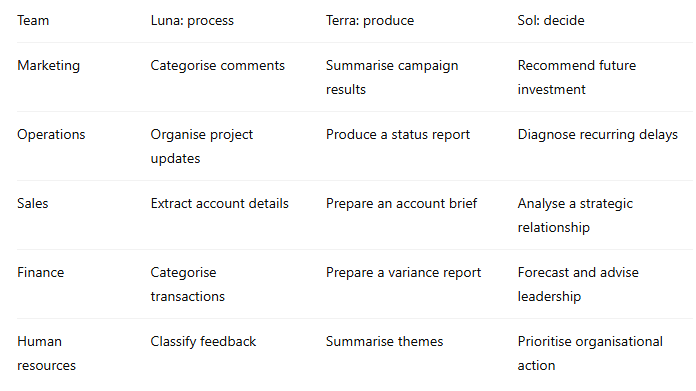
The model changes as the nature of the work changes.
What GPT-5.6 does not change
More capable models do not remove the need for a good brief.
They can navigate ambiguity better, but they cannot automatically know:
Which outcome matters most to you.
Which source is authoritative.
Which internal assumption is outdated.
Which political or organisational consideration is important.
Which recommendation your team is prepared to implement.
What information should remain confidential.
What “good” looks like inside your organisation.
The better the model becomes, the more tempting it is to hand over an unclear request and expect it to work everything out.
Sometimes it will work.
But professional work should not depend on sometimes.
Give the model the outcome, context, audience, constraints and standard expected. Then use its capability to complete more of the work between your instruction and the finished result.
A practical workflow for starting this week
Do not begin by connecting every tool or moving every workflow into ChatGPT.
Choose one piece of work you already complete regularly.
It could be:
A weekly project update.
A campaign performance report.
A meeting preparation brief.
A monthly financial summary.
A content plan.
A customer-feedback analysis.
An executive presentation.
Then follow this process.
Step one: Define the finished outcome
Do not write:
Help me with my weekly report.
Write:
By the end of this task, I need a one-page weekly report that tells leadership what changed, what is at risk and which decisions are needed.
Step two: Gather the context
Provide the notes, files and source systems the model needs. Remove irrelevant material and identify the authoritative sources.
Step three: Choose the smallest capable model
Start with Luna for repetitive processing, Terra for everyday production and Sol for difficult judgement.
Step four: Set the reasoning level
Use a faster setting for simple, well-defined tasks. Increase the reasoning level when the work involves more sources, ambiguity, constraints or consequences.
Step five: Request a plan
For complex tasks, ask the model to show how it intends to approach the work before it begins producing the final output.
Step six: Review assumptions
Correct missing context, weak interpretations and unsupported assumptions early.
Step seven: Inspect the finished work
Verify figures, quotations, recommendations and any claim that could affect a decision.
Step eight: Improve and save the brief
Keep the instructions that worked. Add the corrections you made. The next version should require less intervention.
This is how AI becomes embedded in a workflow. Not through one impressive demonstration, but through a repeatable task that becomes faster and more reliable each time it is completed.
Reflection for the week
The release of Sol, Terra and Luna is not simply an invitation to choose between three models.
It is an invitation to become more deliberate about how intelligence is allocated across your work.
Some tasks need speed. Some need structure. Some need serious judgement.
The professional advantage will not come from always using the most powerful model. It will come from recognising what kind of work is in front of you, choosing the right level of capability and giving the model enough context to complete it properly.
The people who get the most from ChatGPT Work will not be the ones who send the most prompts.
They will be the ones who define outcomes clearly, connect the right information, review the important decisions and build workflows that improve over time.
AI can now do more of the work.
The responsibility for deciding what work matters, what good looks like and what should happen next still belongs to you.
The question worth sitting with this week:
What is one piece of work you currently complete across several tools that ChatGPT Work could help you move from scattered information to a finished outcome?
Help shape future Learn with Tochii articles
I’m putting together future guides on practical ways professionals can use AI at work, in school and in everyday life.
What is one AI question you have always wanted answered?
Your response will help decide what I write about next.
Want to learn how to use AI effectively across your work?
The AI for Business Professionals programme teaches you how to think with AI, learn with it and build workflows that make your time more productive.
Until next week,
Tochii
Founder, Learn with Tochii
Inspire · Educate · Empower
🌐 https://www.tochukwuachebe.com